This post was going to be a continuation of my last post where I ran my first LLM, but, I have to disclose, these first several posts I’m writing retroactively. I began this experiement prior to deciding to blog about it.
After some of the initial testing I was doing, I quickly concluded that I wanted more capable hardware than my 8-core 6-7 year old CPU. So I did some research and concluded that the most cost effective upgrade I could do was to add a GPU to my rig.
- The new Blackwell-based RTX 50 series GPUs are on the market now, but quite expensive.
- The RTX 40 series GPUs are no longer being made and supply is starting to dry up.
- Intel GPUs are really immature and from what I can tell suffer from some significant driver issues. I’d like to test with them, but not now – for now I just want to get a good lab environment up and running.
- AMD GPUs are a decent option, but don’t seem to be quite as good at AI tasks as nVidia GPUs.
- So next in line is the RTX 30 series… and I found that the 3060 comes in a 12GB variant and I was able to find a brand new one on Amazon for $300.
So a few days later, the 12GB 3060 arrived and I realized I didn’t have an 8-pin PCIe power cable anymore… back to Amazon…

I finally got it installed and immediately went to work getting it passed through my ESXi hypervisor to the guest VM and ran into issues getting the drivers and CUDA libraries installed properly.
I was following this guide: https://www.cherryservers.com/blog/install-cuda-ubuntu
… and specifically had trouble when I got to the point of running nvidia-smi to check the management interface – it kept saying no GPU was found.
Long story short, fearing the GPU was faulty or I wasn’t going to be able to run it on a VM with passthrough, I installed Ubuntu to a USB drive and booted Ubuntu on the metal and took the Hypervisor out of the picture. This got me further, but I ran into more issues which turned out to be the fact that ESXi will not properly pass the GPU through to a guest if a monitor is attached to the video card.
Once I took care of that, and still had issues, I then learned that although I had passed the PCIe video device through to the VM, I hadn’t passed the PCIe audi device through.

After configuring that, it was up and running… didn’t even have to reinstall Ollama – it just recognized that a GPU was now present, and used it.
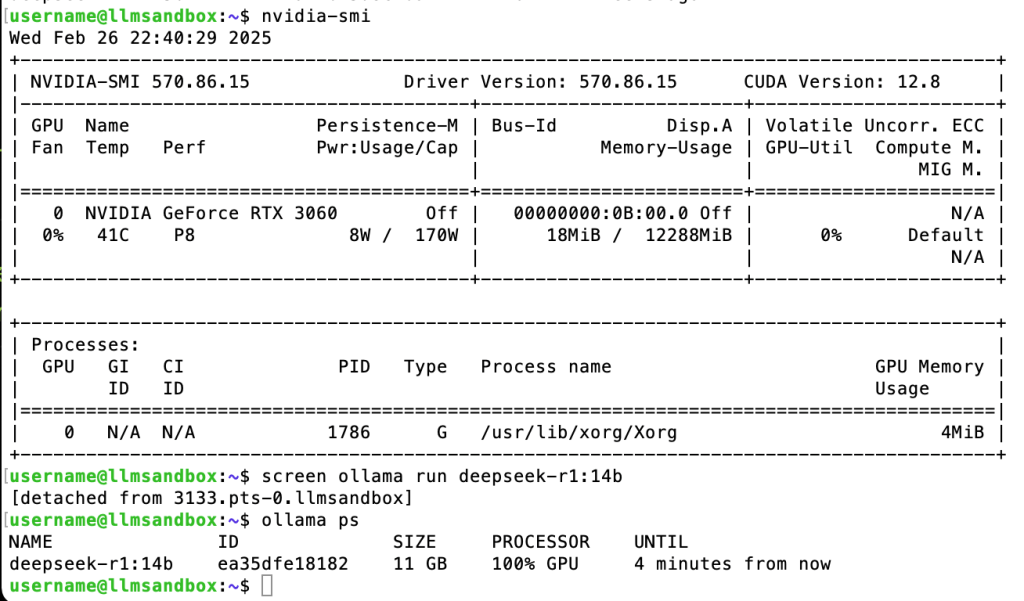
Notice the size of the 14b model is 11GB – fits perfectly within my GPU’s 12GB of VRAM.
In my next post, I’m going to talk about some more new hardware before I get into some more of the actual testing of the LLMs that I’ve started performing.

 ANotSoI
Leave a comment